
This documentation applies to the latest version of Flashnote Derby (version 4).
Android users and other users of earlier versions of Flashnote Derby should
look here for help.
Using ‘Listen to me Play’ With Transposing Instruments
Many band and orchestra instruments are considered transposing instruments. Basically, this means that they produce notes that don’t correspond by name with, for instance, the same note produced by a piano. For instance, if you play a C on a B♭ trumpet , the sound that results would have the pitch of a B♭ on the piano, not a C. Flashnote Derby can take this into account so that your playing is correctly understood when you use Listen To Me Play as your method of answering.
If you haven’t yet selected Listen To Me Play as your answer method, refer to this article for information on how to do so.
After Flashnote Derby is set up for listening, you will need to choose your instrument from the list.
- In Race Settings, tap the icon representing the instrument currently selected (the default instrument is piano).
- Scroll to find your instrument in the list and tap on it. If your specific instrument isn’t in the list, select an instrument with a similar transposition.
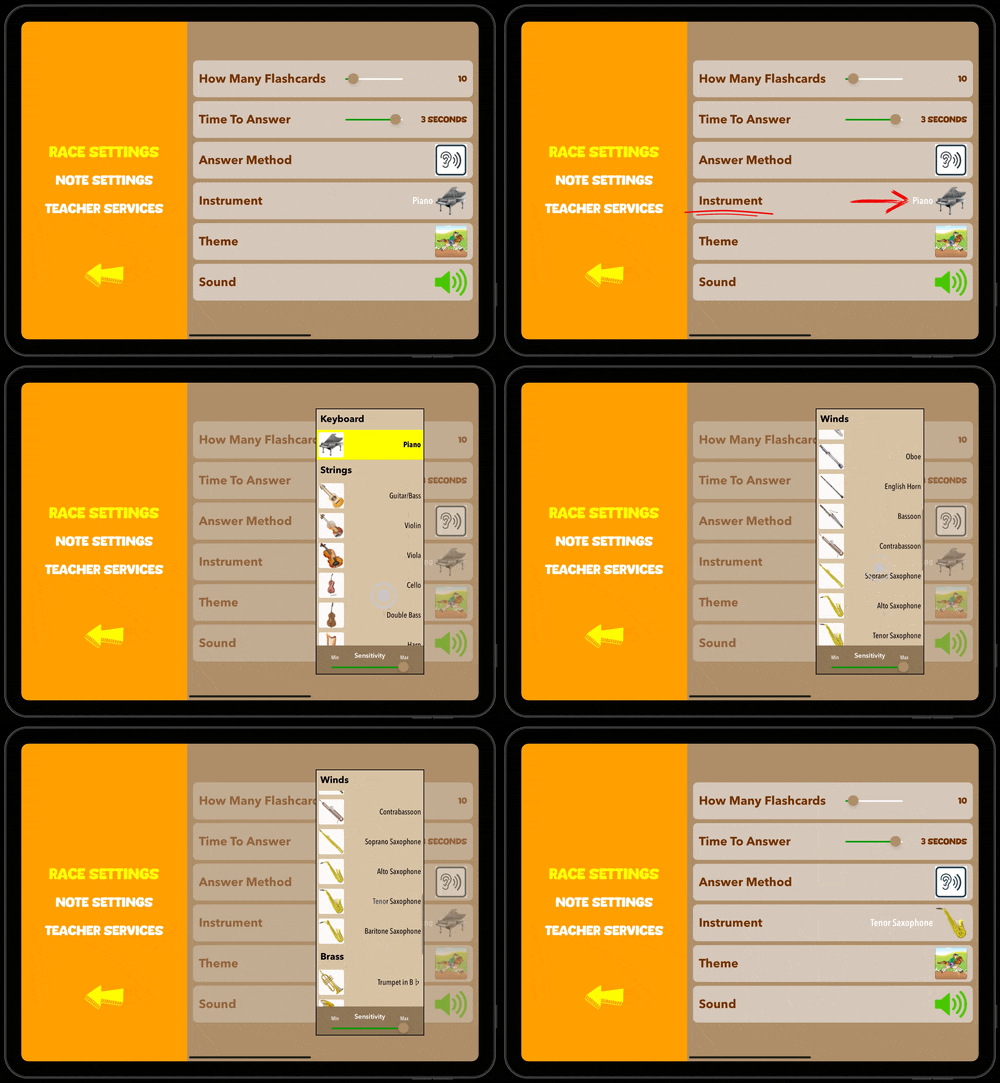
If you have selected an instrument that does not match the transposition of the instrument you are playing, it will appear that you are answering every note incorrectly. If you use multiple instruments with Flashnote Derby, you will need to make sure this setting always matches the current instrument in use.
This setting is specific to each user, so multiple users can use Flashnote Derby with different instruments and not have to continually change the instrument setting.