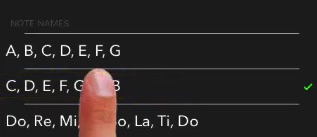
You can change the way Flashnote Derby names the notes.
- Start at the main note-choosing screen…
- Tap the settings icon in the upper right to open the settings pane.

- Tap answer method…

- At the bottom of the scrollable list, look for a section called notes names. Phone users may need to scroll down in order to view this section.
- Choose from the available note naming options. Depending upon the language you are using on your device, you may be able to select music alphabet, solfege (do-re-mi), Northern European (H in place of B), Japanese Kangi, etc…